Skip to content

Device glossary · United States

Glossary for pulse oximeters, blood pressure monitors, and heart rate monitors

What do SpO₂, PI, SYS, and bpm mean? Look up the readings, abbreviations, and features you’ll see on the screen or in the specifications. Start with the device you want to compare.

17 terms

Pulse oximeters

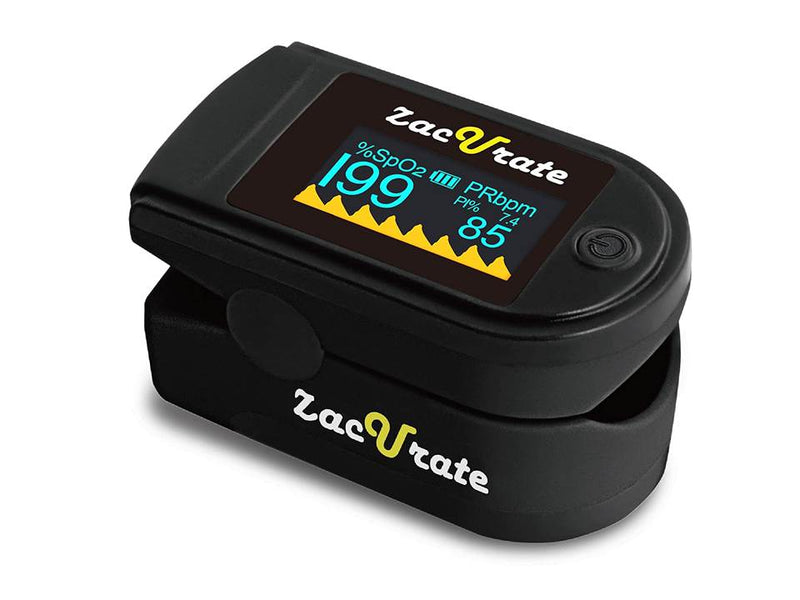
SpO₂ or oxygen saturation

This estimates the percentage of arterial hemoglobin carrying oxygen. Hemoglobin is the protein in red blood cells that transports oxygen.

Where to find it Next to SpO₂ and the % sign.

What to check Check the sensor fit and intended use. Consider how you feel and follow your health professional’s instructions when interpreting a reading.

Read the guide and examples

Source

PI or perfusion index

PI expresses the relationship between the pulsatile and nonpulsatile parts of the signal at the sensor. It can vary with finger choice, placement, and hand temperature.

Where to find it On oximeters that show a number labeled PI.

What to check Check how the instructions interpret PI. The number alone cannot establish that an SpO₂ reading is accurate.

Read the guide and examples

Source

Pulse waveform

The trace shows how the optical signal changes with each pulse. Manufacturers may call it a plethysmographic waveform.

Where to find it Beside the SpO₂ and pulse readings on some oximeters.

What to check Check whether the device shows a waveform, a bar, or both. The waveform lets you watch how the signal behaves during a reading.

Source

Spot check

A spot check gives you a reading at a particular moment. With a fingertip clip, you place the device, read the result, and remove it as directed.

Where to find it In product descriptions and manuals that specify spot-check use.

What to check If you want to follow changes over time, check whether the device saves readings or you need to record them yourself.

Read the guide and examples

Source

Session recording

A recording oximeter saves data at intervals. When you review the session, you can see how readings changed during the recorded period.

Where to find it In the session length, recording interval, and storage specifications.

What to check Compare those three specifications with battery life. A long battery runtime does not determine how long one saved recording can be.

Read the guide and examples

Source

Blood pressure monitors

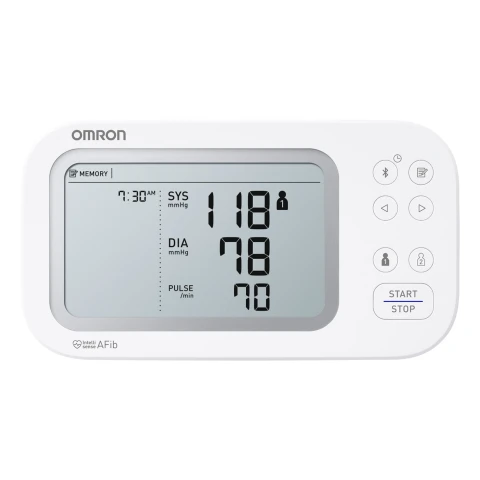
Systolic pressure (SYS)

Systolic pressure is the pressure in the arteries while the heart contracts and pumps blood. It usually appears above or before diastolic pressure.

Where to find it Next to SYS or as the first value in a blood pressure reading.

What to check Check whether you can easily tell the top number, bottom number, and pulse rate apart on the display.

Read the guide and examples

Source

Diastolic pressure (DIA)

Diastolic pressure is the pressure in the arteries between beats while the heart relaxes. It usually appears below the systolic number.

Where to find it Next to DIA or as the second number.

What to check If you keep a log, record both values with the date and time. Follow the device instructions for positioning and measuring.

Read the guide and examples

Source

mm Hg

This stands for millimeters of mercury, the usual unit for blood pressure in the United States.

Where to find it Beside the systolic and diastolic numbers on the display or in a report.

What to check Write down the numbers in the unit shown. If the app offers a choice of units, confirm which one is selected.

Source

Cuff and arm circumference

The cuff inflates around your upper arm or wrist. Circumference is the measurement around that part of your body. Each cuff is labeled for a size range.

Where to find it On the cuff label and in the monitor’s specifications.

What to check Use a flexible measuring tape, then check the range and part number. Measure wrist circumference separately when shopping for a wrist monitor.

Read the guide and examples

Source

Oscillometric method

An automatic monitor detects small pressure oscillations your pulse creates inside the cuff. It estimates blood pressure from that signal.

Where to find it Under the measurement method in the specifications.

What to check Two monitors can use the same method and have different validation records. Look up the exact model and cuff sizes.

Read the guide and examples

Source

AFib screening and irregular heartbeat indicators

An AFib indicator belongs to a specific screening feature. Other indicators flag irregular timing between pulses. The manual explains each symbol.

Where to find it On the monitor display and in the feature description.

What to check Check the exact feature, who it is intended for, and what the instructions recommend. Discuss a concerning alert with your health professional.

Read the guide and examples

Source

Shared features

Pulse rate, PR, and bpm

Pulse rate is the number of pulses per minute. PR stands for pulse rate, and bpm means beats per minute. Oximeters usually show pulse rate next to oxygen saturation.

Where to find it On screens and apps for oximeters, blood pressure monitors, and heart rate monitors.

What to check To log a workout, check whether the sensor sends your heart rate to the watch or app you use.

Read the guide and examples

Source

OLED display

Pixels in an OLED screen emit light. The display type affects how you see the numbers and indicators.

Where to find it In the display specifications.

What to check Compare digit size, orientation, and brightness. Screen technology describes how you see the information. The manual lists the device’s measurement features.

Source

Bluetooth

Bluetooth is a short-range wireless connection. It can send readings to an app or broadcast heart rate to compatible equipment.

Where to find it In the connection icon and compatibility lists.

What to check Check the app, your phone’s operating system, and what data transfers. Some heart rate monitors also use ANT+ to connect to compatible receivers.

Read the guide and examples

Source

Memory and reading history

The device can store a set number of readings. An app can keep a separate history. Some monitors store readings under separate user profiles.

Where to find it In the memory specifications, profile selector, and app.

What to check Check the capacity per profile and what happens when it is full. If you share a device, select your profile before you measure.

Source

Intended use and model number

Intended use describes who should use the device and for what purpose. The model number identifies the version covered by the instructions.

Where to find it On the box, device label, and manual.

What to check Match the listing’s model number with the manual. Check the version, intended users, and included accessories.

Source

Clinical validation for a blood pressure monitor

Clinical validation evaluates a model using a defined protocol and conditions. In the United States, you can look up specific devices and model numbers in validation registries.

Where to find it In model-specific registries and manufacturer documentation.

What to check Look up the full model number. Check which cuffs, users, and conditions the validation covers.

Read the guide and examples

Source
Two examples from US devices

As an Amazon Associate I earn from qualifying purchases.