How-to guide · Fingertip pulse oximeters
Perfusion index (PI) on a pulse oximeter
The perfusion index describes part of the sensor signal. See how it differs from oxygen saturation and pulse rate, and when you might want it on the display.
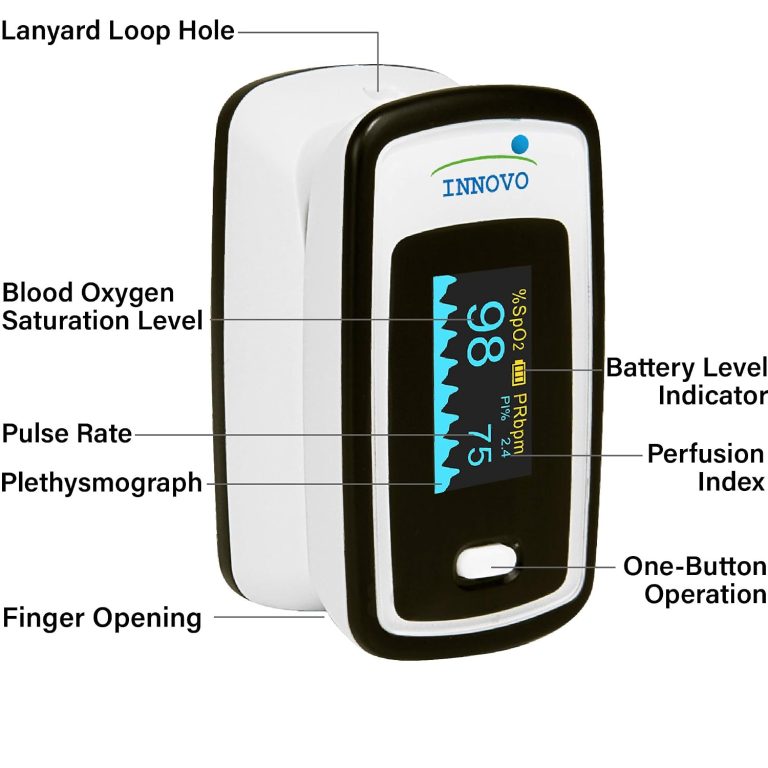
PI, SpO₂, and PR are different readings
PI compares the pulsatile and nonpulsatile parts of the optical signal. SpO₂ estimates oxygen saturation. PR is pulse rate in beats per minute. A change in PI does not mean that oxygen saturation changed.
Imagine the display shows SpO₂, pulse, and PI at the same time. First match each number to its label. SpO₂ is shown as a percentage, and pulse as beats per minute. PI describes the pulsatile signal at that finger. If PI changes, check sensor placement and look at the other readings separately.
Is there a normal PI for everyone?
The number varies with sensor placement, local circulation, and the device. Check the manual for what your model displays. If a healthcare professional asked you to monitor, follow their instructions about the device and readings.
Two devices can display PI differently even on the same person. Finger temperature and circulation also matter. To compare checks, use the recommended technique, note the conditions, and read the instructions for that model to understand what its display means.
What to check if PI is low or changes
Check sensor placement and fit. Keep your hand still and warm and wait for the display to settle. Movement, temperature, and circulation can affect the signal. The number alone cannot identify a cause.
If you are concerned about how you feel, consider your symptoms and seek medical care when appropriate. The index cannot replace a clinician’s assessment.
If the number jumps when you move your hand, check that your finger is still and the sensor is positioned correctly. The waveform can help you see when the signal steadies. If a reading concerns you, consider the circumstances and symptoms and follow your health professional’s guidance.
When to choose a pulse oximeter with PI
For a spot check, an easy-to-read screen with SpO₂ and pulse may be enough. The Innovo iP900AP Deluxe shows PI and a pulse waveform if you want more information about the signal. Check whether the model saves those readings or only displays them.
Innovo iP900AP Deluxe product guide · Compare fingertip pulse oximeters
Before buying for PI, distinguish a number from a bar or waveform. A display may show the signal without giving a numeric PI. If you also want to keep the reading, check whether the manual says the device saves it or whether you need to log it separately.